Loading...
Searching...
No Matches
CircuitWireRenderer Class Reference
Dibuja cables visuales entre componentes del circuito usando LineRenderer. Se actualiza automáticamente cuando el circuito cambia (OnCircuitChanged). More...
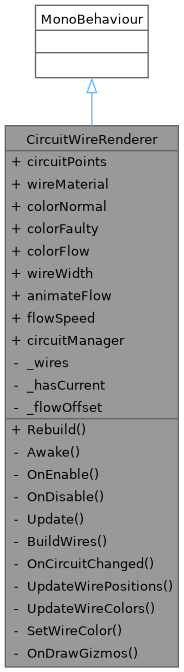
Inheritance diagram for CircuitWireRenderer:
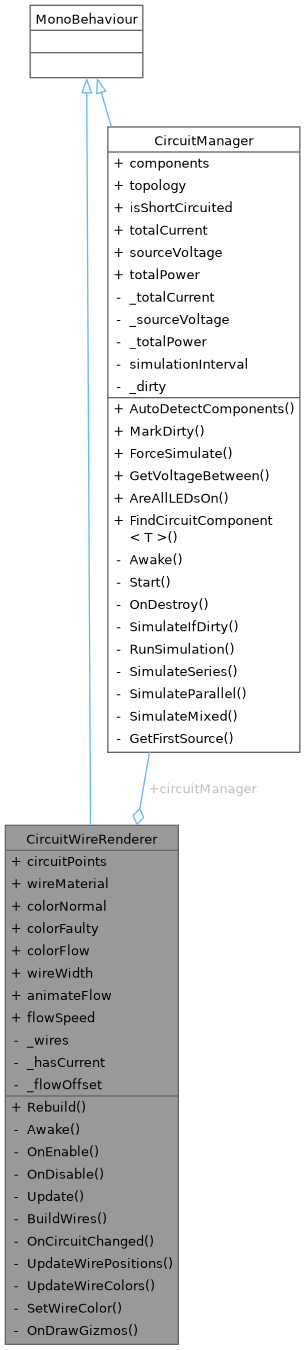
Collaboration diagram for CircuitWireRenderer:
Public Member Functions | |
| void | Rebuild () |
| Reconstruye todos los cables (útil al mover componentes en runtime). | |
Public Attributes | |
| List< Transform > | circuitPoints = new List<Transform>() |
| Material | wireMaterial |
| Color | colorNormal = new Color(0.2f, 0.8f, 0.3f) |
| Color | colorFaulty = new Color(0.8f, 0.2f, 0.2f) |
| Color | colorFlow = new Color(0.4f, 1.0f, 0.6f) |
| float | wireWidth = 0.015f |
| bool | animateFlow = true |
| float | flowSpeed = 1.5f |
| CircuitManager | circuitManager |
Private Member Functions | |
| void | Awake () |
| void | OnEnable () |
| void | OnDisable () |
| void | Update () |
| void | BuildWires () |
| void | OnCircuitChanged () |
| void | UpdateWirePositions () |
| void | UpdateWireColors () |
| void | SetWireColor (LineRenderer lr, Color c) |
| void | OnDrawGizmos () |
Private Attributes | |
| List< LineRenderer > | _wires = new List<LineRenderer>() |
| bool | _hasCurrent = false |
| float | _flowOffset = 0f |
Detailed Description
Dibuja cables visuales entre componentes del circuito usando LineRenderer. Se actualiza automáticamente cuando el circuito cambia (OnCircuitChanged).
SETUP en Unity:
- Crear Empty GameObject hijo de Circuit → renombrar "WireRenderer"
- Agregar este script
- Definir las conexiones en el inspector arrastrando los Transforms
- El script crea un LineRenderer por cada cable automáticamente
JERARQUÍA RESULTANTE: Circuit ├─ VoltageSource ├─ Resistor ├─ LED ├─ Node Positive ← esferas de nodo ├─ Node Ground └─ WireRenderer ← este script ├─ Wire_0 ← generado automáticamente ├─ Wire_1 └─ Wire_2
Member Function Documentation
◆ Awake()
|
private |
◆ BuildWires()
|
private |
◆ OnCircuitChanged()
|
private |
◆ OnDisable()
|
private |
◆ OnDrawGizmos()
|
private |
◆ OnEnable()
|
private |
◆ Rebuild()
| void CircuitWireRenderer.Rebuild | ( | ) |
Reconstruye todos los cables (útil al mover componentes en runtime).
◆ SetWireColor()
|
private |
◆ Update()
|
private |
◆ UpdateWireColors()
|
private |
◆ UpdateWirePositions()
|
private |
Member Data Documentation
◆ _flowOffset
|
private |
◆ _hasCurrent
|
private |
◆ _wires
|
private |
◆ animateFlow
| bool CircuitWireRenderer.animateFlow = true |
◆ circuitManager
| CircuitManager CircuitWireRenderer.circuitManager |
◆ circuitPoints
| List<Transform> CircuitWireRenderer.circuitPoints = new List<Transform>() |
◆ colorFaulty
| Color CircuitWireRenderer.colorFaulty = new Color(0.8f, 0.2f, 0.2f) |
◆ colorFlow
| Color CircuitWireRenderer.colorFlow = new Color(0.4f, 1.0f, 0.6f) |
◆ colorNormal
| Color CircuitWireRenderer.colorNormal = new Color(0.2f, 0.8f, 0.3f) |
◆ flowSpeed
| float CircuitWireRenderer.flowSpeed = 1.5f |
◆ wireMaterial
| Material CircuitWireRenderer.wireMaterial |
◆ wireWidth
| float CircuitWireRenderer.wireWidth = 0.015f |
The documentation for this class was generated from the following file:
- Assets/Scripts/Gameplay/CircuitWireRenderer.cs