Loading...
Searching...
No Matches
MultimeterUI Class Reference
HUD mínimo del Explorador — muestra SOLO la lectura del multímetro. Aparece en el casco VR (World Space Canvas pegado a Main Camera). More...
Inheritance diagram for MultimeterUI:
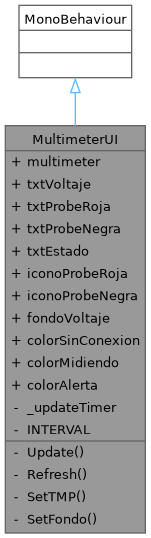
Collaboration diagram for MultimeterUI:

Public Attributes | |
| Multimeter | multimeter |
| TMP_Text | txtVoltaje |
| TMP_Text | txtProbeRoja |
| TMP_Text | txtProbeNegra |
| TMP_Text | txtEstado |
| Image | iconoProbeRoja |
| Image | iconoProbeNegra |
| Image | fondoVoltaje |
| Color | colorSinConexion = new Color(0.1f, 0.1f, 0.15f, 0.85f) |
| Color | colorMidiendo = new Color(0.05f, 0.2f, 0.05f, 0.85f) |
| Color | colorAlerta = new Color(0.25f, 0.1f, 0.0f, 0.85f) |
Private Member Functions | |
| void | Update () |
| void | Refresh () |
| void | SetTMP (TMP_Text t, string s) |
| void | SetFondo (Color c) |
Private Attributes | |
| float | _updateTimer |
Static Private Attributes | |
| const float | INTERVAL = 0.1f |
Detailed Description
HUD mínimo del Explorador — muestra SOLO la lectura del multímetro. Aparece en el casco VR (World Space Canvas pegado a Main Camera).
El Explorador NO ve manuales ni fórmulas — solo el valor medido y el color de los LEDs del circuito. Debe comunicar lo que ve al Técnico verbalmente para que este pueda diagnosticar.
JERARQUÍA EN UNITY: XR Origin └─ Camera Offset └─ Main Camera └─ ExplorerHUD [Canvas World Space] ├─ Panel_Multimetro ← este script va aquí └─ Panel_Instruccion ← PlayerFeedbackUI va aquí
Member Function Documentation
◆ Refresh()
|
private |
◆ SetFondo()
|
private |
◆ SetTMP()
|
private |
◆ Update()
|
private |
Member Data Documentation
◆ _updateTimer
|
private |
◆ colorAlerta
| Color MultimeterUI.colorAlerta = new Color(0.25f, 0.1f, 0.0f, 0.85f) |
◆ colorMidiendo
| Color MultimeterUI.colorMidiendo = new Color(0.05f, 0.2f, 0.05f, 0.85f) |
◆ colorSinConexion
| Color MultimeterUI.colorSinConexion = new Color(0.1f, 0.1f, 0.15f, 0.85f) |
◆ fondoVoltaje
| Image MultimeterUI.fondoVoltaje |
◆ iconoProbeNegra
| Image MultimeterUI.iconoProbeNegra |
◆ iconoProbeRoja
| Image MultimeterUI.iconoProbeRoja |
◆ INTERVAL
|
staticprivate |
◆ multimeter
| Multimeter MultimeterUI.multimeter |
◆ txtEstado
| TMP_Text MultimeterUI.txtEstado |
◆ txtProbeNegra
| TMP_Text MultimeterUI.txtProbeNegra |
◆ txtProbeRoja
| TMP_Text MultimeterUI.txtProbeRoja |
◆ txtVoltaje
| TMP_Text MultimeterUI.txtVoltaje |
The documentation for this class was generated from the following file:
- Assets/Scripts/UI/MultimeterUI.cs