HUD de instrucciones del Explorador — muestra ACCIONES, nunca teoría. More...
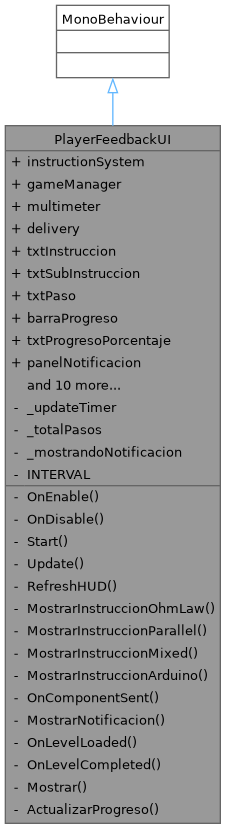
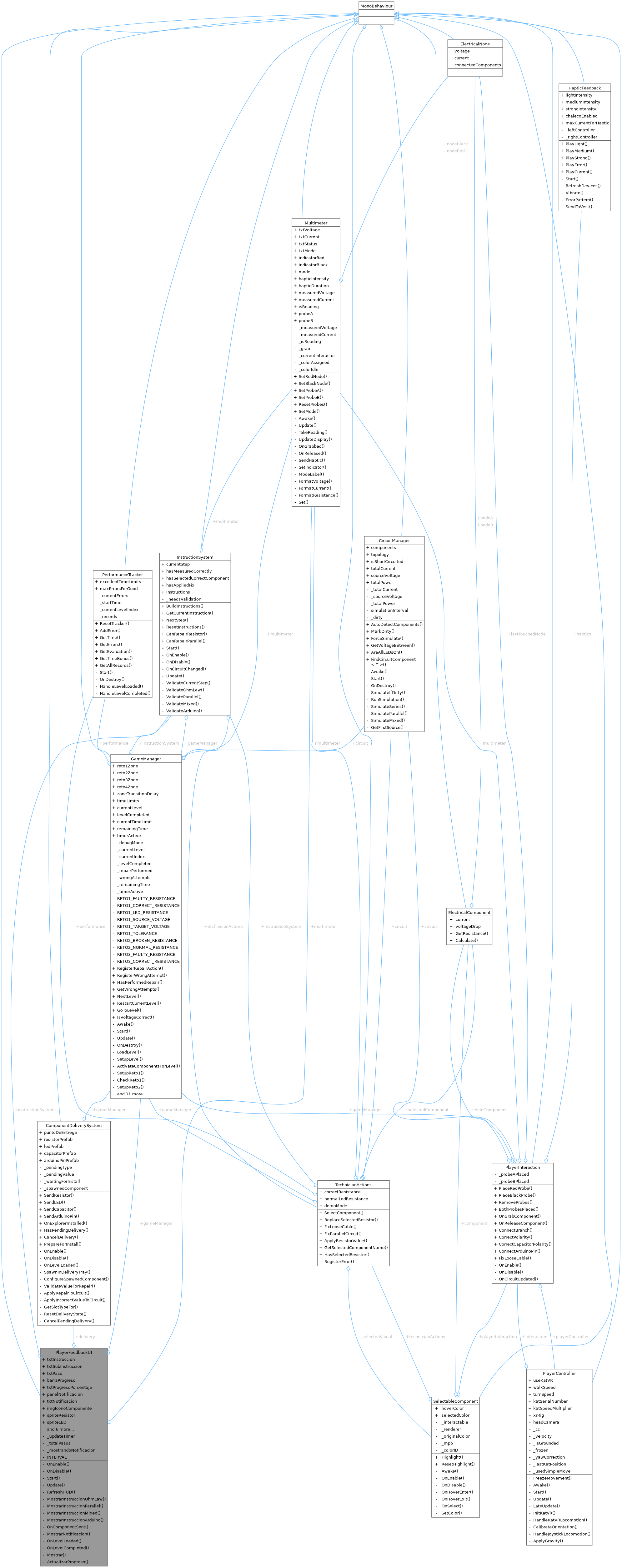
Public Attributes | |
| InstructionSystem | instructionSystem |
| GameManager | gameManager |
| Multimeter | multimeter |
| ComponentDeliverySystem | delivery |
| TMP_Text | txtInstruccion |
| TMP_Text | txtSubInstruccion |
| TMP_Text | txtPaso |
| Image | barraProgreso |
| TMP_Text | txtProgresoPorcentaje |
| GameObject | panelNotificacion |
| TMP_Text | txtNotificacion |
| Image | imgIconoComponente |
| Sprite | spriteResistor |
| Sprite | spriteLED |
| Sprite | spriteCapacitor |
| Color | colorNormal = new Color(0.05f, 0.05f, 0.15f, 0.88f) |
| Color | colorAccion = new Color(0.05f, 0.15f, 0.05f, 0.88f) |
| Color | colorAlerta = new Color(0.2f, 0.08f, 0.0f, 0.88f) |
| Color | colorCompletado = new Color(0.0f, 0.2f, 0.05f, 0.88f) |
| Image | fondoPanel |
Private Member Functions | |
| void | OnEnable () |
| void | OnDisable () |
| void | Start () |
| void | Update () |
| void | RefreshHUD () |
| void | MostrarInstruccionOhmLaw () |
| void | MostrarInstruccionParallel () |
| void | MostrarInstruccionMixed () |
| void | MostrarInstruccionArduino () |
| void | OnComponentSent (ComponentType tipo, float valor) |
| IEnumerator | MostrarNotificacion (string mensaje, Sprite icono) |
| void | OnLevelLoaded (LevelType level) |
| void | OnLevelCompleted (LevelType level, bool success) |
| void | Mostrar (string instruccion, string sub, Color _, Color fondo) |
| void | ActualizarProgreso () |
Private Attributes | |
| float | _updateTimer |
| int | _totalPasos = 4 |
| bool | _mostrandoNotificacion = false |
Static Private Attributes | |
| const float | INTERVAL = 0.15f |
Detailed Description
HUD de instrucciones del Explorador — muestra ACCIONES, nunca teoría.
Principio: el Explorador no necesita saber el por qué, solo el qué hacer ahora mismo. Ejemplos correctos: "Mide el nodo A con la punta roja" Ejemplos INCORRECTOS: "Calcula V=I×R para encontrar la resistencia"
También muestra la notificación cuando el Técnico envía un componente.
JERARQUÍA: ExplorerHUD [Canvas World Space, hijo de Main Camera] └─ Panel_Instruccion ← este script va aquí ├─ TMP_Instruccion (instrucción principal) ├─ TMP_SubInstruccion (detalle adicional) ├─ TMP_Paso ("Paso 2 de 4") ├─ Panel_Notificacion (aparece cuando llega componente) │ ├─ TMP_Notificacion │ └─ Img_Icono └─ Img_Progreso (barra de progreso del reto)
Member Function Documentation
◆ ActualizarProgreso()
|
private |
◆ Mostrar()
|
private |
◆ MostrarInstruccionArduino()
|
private |
◆ MostrarInstruccionMixed()
|
private |
◆ MostrarInstruccionOhmLaw()
|
private |
◆ MostrarInstruccionParallel()
|
private |
◆ MostrarNotificacion()
|
private |
◆ OnComponentSent()
|
private |
◆ OnDisable()
|
private |
◆ OnEnable()
|
private |
◆ OnLevelCompleted()
|
private |
◆ OnLevelLoaded()
|
private |
◆ RefreshHUD()
|
private |
◆ Start()
|
private |
◆ Update()
|
private |
Member Data Documentation
◆ _mostrandoNotificacion
|
private |
◆ _totalPasos
|
private |
◆ _updateTimer
|
private |
◆ barraProgreso
| Image PlayerFeedbackUI.barraProgreso |
◆ colorAccion
| Color PlayerFeedbackUI.colorAccion = new Color(0.05f, 0.15f, 0.05f, 0.88f) |
◆ colorAlerta
| Color PlayerFeedbackUI.colorAlerta = new Color(0.2f, 0.08f, 0.0f, 0.88f) |
◆ colorCompletado
| Color PlayerFeedbackUI.colorCompletado = new Color(0.0f, 0.2f, 0.05f, 0.88f) |
◆ colorNormal
| Color PlayerFeedbackUI.colorNormal = new Color(0.05f, 0.05f, 0.15f, 0.88f) |
◆ delivery
| ComponentDeliverySystem PlayerFeedbackUI.delivery |
◆ fondoPanel
| Image PlayerFeedbackUI.fondoPanel |
◆ gameManager
| GameManager PlayerFeedbackUI.gameManager |
◆ imgIconoComponente
| Image PlayerFeedbackUI.imgIconoComponente |
◆ instructionSystem
| InstructionSystem PlayerFeedbackUI.instructionSystem |
◆ INTERVAL
|
staticprivate |
◆ multimeter
| Multimeter PlayerFeedbackUI.multimeter |
◆ panelNotificacion
| GameObject PlayerFeedbackUI.panelNotificacion |
◆ spriteCapacitor
| Sprite PlayerFeedbackUI.spriteCapacitor |
◆ spriteLED
| Sprite PlayerFeedbackUI.spriteLED |
◆ spriteResistor
| Sprite PlayerFeedbackUI.spriteResistor |
◆ txtInstruccion
| TMP_Text PlayerFeedbackUI.txtInstruccion |
◆ txtNotificacion
| TMP_Text PlayerFeedbackUI.txtNotificacion |
◆ txtPaso
| TMP_Text PlayerFeedbackUI.txtPaso |
◆ txtProgresoPorcentaje
| TMP_Text PlayerFeedbackUI.txtProgresoPorcentaje |
◆ txtSubInstruccion
| TMP_Text PlayerFeedbackUI.txtSubInstruccion |
The documentation for this class was generated from the following file:
- Assets/Scripts/UI/PlayerFeedbackUI.cs